

Overview
I was tasked with designing an app for Tapsell's human resource department that would allow employees to easily book rooms for their meetings. After researching their current booking process, I identified several pain points that the app would need to address, including a lack of visibility into room availability and difficulty coordinating with other teams.

Where
Tehran, Iran
What
Native mobile App
Role
Designer, Researcher
Goals
Our primary goal is to organize the meetings in the company. For doing that we need
1- First, See what their current method for scheduling the meeting
2- secondly, we needed to rethink and refresh what was an unreliable approach for scheduling their meetings.
3- Finally, a key objective was to boost team engagement and encourage better communication for meeting scheduling.

Kickoff
I started this project by employing ethnographic research methods to gain a deep understanding of Tapsell's organizational culture.
Through my ethnographic research, I observed the day-to-day life at Tapsell and gained insight into what meetings were typically like. I noticed that meetings were often difficult to schedule due to the limited availability of meeting rooms and conflicting schedules among team members. Additionally, I found that some employees were hesitant to speak up during meetings or express their opinions, which could lead to important issues going unaddressed.
These observations helped inform the design of the room booking app, as well as strategies for encouraging better communication and engagement during meetings. By addressing these challenges, we aimed to create a more efficient and collaborative meeting culture at Tapsell.

Finding of Kickoff
The kickoff was a fact-finding and scope definition exercise which I used as an opportunity to ask questions about how the company worked from their meetings. Amongst the things I learned, a couple of things, in particular, stood out
1- Their current method for booking the room is to create a calendar for meeting rooms, which was inefficient because it was time-consuming, and the issue of overlapping meetings.
2- The HR department hire a person to coordinate their meetings using Google Calendar, but unfortunately, this approach proved unproductive as the person in charge was not always available. This led to lengthy waiting periods and a highly manual scheduling process
Research
Why User interview
User Interview
I conducted User interviews among the people who are working at Tapsell and also they people who are most likely to arrange the meetings and schedule the meetings such as human resource people and managers.
I conducted user interviews because the resources available for the project were very limited, and conducting user interviews was a cost-effective way to gain insights into the users' needs, preferences, and pain points.
Average daily meeting

I have 1 -3 daily meetings, depends on the day.
Mohammad

I have 3 daily meetings, depends on the day.
Mohsen
Tools For schedule a meeting
Google Calendar
Mohammad
Google calendar
Mohsen
Biggest problem when scheduling
-
Finding people and see their free time
-
Not visible that the room are booked
Mohammad
-
Not having access to people for meeting
-
Sometimes forget to add a person to meeting
Mohsen
Persona
I conducted User interviews among the people who are working at Tapsell and also they people who are most likely to arrange the meetings and schedule the meetings such as human resource people and managers.

User journey map
To better understand of my user and his problems, I defined the user journey map when he wants to book and meeting with his teammates

What's the result of research?
After conducting the user journey map, I identified several pain points in the current booking process, such as a lack of visibility into room availability and difficulty coordinating with other teams. To address these challenges, I proposed a mobile app that would allow employees to easily book rooms for their meetings.
The app would feature a user-friendly interface that provides real-time information on room availability and allows users to easily book a room for their meeting. Users can also view and manage their existing bookings, as well as cancel or reschedule meetings as needed.
To encourage better communication and engagement during meetings, the app would also feature a Note function that allows users to communicate with other attendees before, during, and after the meeting. This would help to ensure that everyone is on the same page and that all issues are properly addressed.
To ensure that the app is easily accessible to all employees, I proposed a rollout plan that includes training sessions and support for employees who may have difficulty using the app. This would help to ensure that everyone is able to take advantage of the benefits of the new booking system
Why mobile App
We identified that some key people at the company, such as those who have meeting outside of company or people may not have access to computers.
Flow diagram
To outline all the necessary functionality I created a simple flow diagram of the main tasks the users can do.

Design
Low-fidelity Wireframe
Once the flow diagram was established. I started creating low - fidelity wireframes of the main flows.
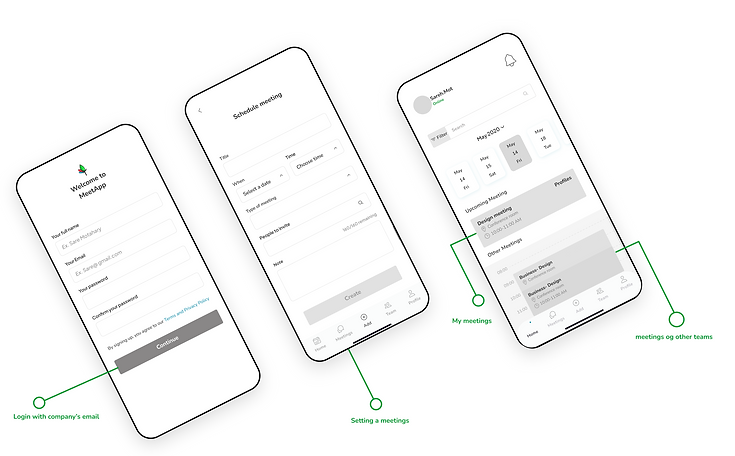
High-fidelity Wireframe
Once the initial flow was complete, I started by creating a couple of the main screens of the app. I started by defining the fonts and colors.


Development stage
After Finishing this UI design, I passed to Engineering and it is developing now.
One challenge that arose during the development phase of the app was syncing Gmail with the calendar system. This was a crucial feature that would allow employees to easily book rooms for their meetings,
but it proved to be time-consuming and complex for the engineering team.
To address the issue of syncing Gmail with the calendar, we implemented a solution that allowed users to manually schedule their meetings for the first launch of the app. This allowed users to quickly and easily book rooms for their meetings without relying on the automatic syncing feature.
While the manual scheduling process required more effort on the part of the user, we found that it was a necessary solution to ensure that meetings could be scheduled efficiently and without errors. The manual scheduling feature was designed to be user-friendly and intuitive, with clear instructions and prompts to guide users through the process
Take a look a example of MeetApp onboarding
Auditing every step for creating an account
I also conducted an audit of each of the key experiences to help with identifying each step that the user experienced. In doing this audit, I made sure to map our qualitative findings to each touchpoint.
Step 1:
User downloads MeetApp from the link they receive from the company and opens the app.
Step 2:
The user chooses to create a new account, they will be prompted to enter their email address and choose a secure password.


Step 3:
Once the user has entered their email address and password, they will be asked to enter a code that we sent to their email address.

Use Company’s email to save time and do not need admin account to prove that particular person has the email in company.


Auditing every step for scheduling a meeting


