

WaterFall
Tracking Your Water intake
User interview
Where
Tehran, Iran
Competitive analysis
Wireframes
What
Native mobile App (iOS)
High fidelity UI
Role
Designer, Researcher
Introduction
Summary
My idea was an app that would help you to track your daily water intake. It reminds you to drink enough water and you can invite your friends to join and motivate them to drink more water.
Goal
Provide an app that helps busy or forgetful people to achieve their daily water intake.💡
Motivate people to remind them to drink water 🥳
Problem statement

The answer to the question "how much water do you drink per day" is quite surprising, because people sometimes drink barely one glass of water per day which is not healthy. So, in this stage I understand the problem: people do not drink enough water.
Potential Key Features
-
Users track their daily water intake.
-
Set the time for themself to drink water and invite friends to join them to drink water together
-
Main screen/information: How much did the user drink today, and how much does she/he have left?
-
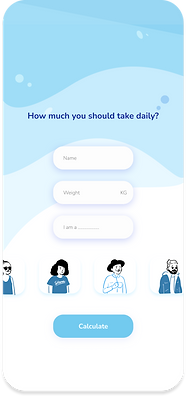
Water intake calculator: The user enters her/his information, and the app calculates how much water the user should drink per day.
-
Add: Whenever the user drank water, she/he can add it to the app.
Research
User Interview
I conducted User interviews among the people who are working at Tapsell and also they people who are most likely to arrange the meetings and schedule the meetings such as human resource people and managers.
How much do you drink water
How do you remind yourself to drink water

2-3 glass of water
Maryam

1 bottle
Mohsen

Rarely 2 galsses
Fahima
My phone alarm
Maryam
Put a glass near myself
Mohsen
When feeling thirsty
Fahima

Biggest problem
Going to bathroom at office
Maryam
Water is not tastey
Mohsen
Going to public bathroom with I'm outside
Fahima
What time do you mostly drink water
In the morning
Maryam
Morning - Afternoon
Mohsen
Before Bed
Fahima
Competitive Analysis
There are too many apps for track your daily water intake, However I chose three of them base on the number of download and reviews.

The good
Beautiful Design
Easy to understand
Funny to use
Free
The Weaknesses
Too many icons = confusing
Cannot share you accomplishment

The good
Good calculator
Reminder
Show your water intake by graphs
Easy intractive design
Can share you daily water intake
Free
The Weaknesses
Cannot invite other

The good
Good calculator
Reminder
Show your water intake by graphs
Easy intractive design
Free
The Weaknesses
Before start, there are some quotes about benefits of drinking water. it is quite time consuming
Cannot share you accomplishment
Persona
In this stage, I want to understand my users by answering the WHO question and creating a persona. people whom I interviewed had common goals or problems about drinking a certain amount of water. so I created two kinds of persona based on the interviewers.

Design
Low-fidelity Wireframe
Once the flow diagram was established. I started creating low - fidelity wireframes of the main flows.

High-fidelity Wireframe
Once the initial flow was complete, I started by creating a couple of the main screens of the app.




Lessons that I learned
This is the first project that I designed. So, it helped to understand basic knowledge of UX research and UI design and worked with Figma